
Startup pitch videos with AI: a 90-second structure that works
How to make a startup pitch video with AI: a 90-second structure, traction rules, slide and type sizes, pacing and a full sample script you can adapt.
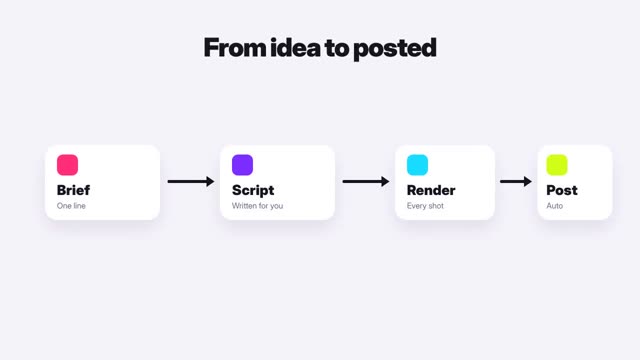
What a pitch video has to do
A startup pitch video explains in 60 to 120 seconds what problem you solve, for whom, how, why now and what you are asking for. Make one with AI by writing the script first, using real product footage or clean motion graphics for the demo, and putting only true, checkable numbers on screen.
Pitch videos are used for accelerator applications, investor intros, crowdfunding pages and launch posts. Each reader is deciding whether to spend ten more minutes on you. The video’s job is to earn that ten minutes, not to close a deal.
A 90-second structure
- 0–10 s · Problem. One specific person with one specific pain.
- 10–25 s · Solution. What your product does, in one sentence, then shown.
- 25–45 s · Demo. The product doing the job, from the user’s side.
- 45–60 s · Proof. Real traction, pilots, waitlist, revenue or user quotes you have permission to use.
- 60–75 s · Why you and why now. Team fit and what changed in the market.
- 75–90 s · The ask. What you want from this viewer and how to reach you.
Accelerators and platforms often set their own length and content rules. Follow those first.
Honesty rules that protect you
Investors check. A pitch video that overstates anything is worse than no video.
- Only show numbers you can document. If you have none yet, show what you have learned or built.
- Label mockups and concept renders as such. AI-generated product shots of something that does not exist yet should say “concept.”
- Do not use an AI avatar to stand in for a founder without saying so. Use your own voice or face where you can.
- Get written permission before quoting customers or showing their logos.
- Rules on publicly promoting a fundraise vary by country and by the type of raise. Check with a lawyer before you post a pitch that mentions investment terms.
Design: slides, type and motion
Pitch videos are usually watched on a laptop, so design 16:9 first at 1920 by 1080, then cut a vertical version for social.
- Headline per scene: 72 to 96 px, six words or fewer.
- Supporting text: 40 to 48 px, one line, never a paragraph.
- Numbers: 140 px or larger, with the unit and the date beside them.
- Words per scene on screen: under 12. The narration carries the rest.
- Color: your brand color plus neutrals. Use the accent only on the number or word that matters.
- Contrast: 4.5:1 or better for all text.
Change the visual every 3 to 6 seconds. A product clip, a chart, a face, a headline. Avoid long holds on static slides.
A full sample script
This is for a made-up startup called ShiftSwap, an app for hourly workers to trade shifts. Bracketed values are placeholders for your real numbers. Do not publish placeholders.
- 0–10 s · Close-up of a phone buzzing at night. Text: “Can’t make Saturday?” VO: “If you work hourly and can’t make a shift, you spend your night texting coworkers to cover it.” Try it
- 10–18 s · Logo sting, then text: “Trade shifts in two taps.” VO: “ShiftSwap lets workers trade shifts in two taps, with manager approval built in.” Try it
- 18–40 s · Screen recording: post a shift, a coworker claims it, the manager approves. Labels at 56 px: “Post,” “Claim,” “Approve.”
- 40–55 s · Big number: “[X] shifts swapped” and “[Y] stores in pilot,” each with a date. VO: “Since our pilot began in [month], [X] shifts have been swapped across [Y] stores.” Try it
- 55–70 s · Team photo with roles. VO: “We ran store schedules for years before building this. [Name the market change you can point to and source.]”
- 70–85 s · Text: “Raising our first round.” VO: “We’re raising to expand to [Z] more chains.”
- 85–90 s · Contact card: name, email, website.
Making it in ClickPop
Promo Video in ClickPop can start from your website: paste the link and choose a product promo or website explainer, then edit the script to match the structure above. Use real screen recordings for the demo. Faceless Studio draws charts and numbers in code, so your traction figures appear exactly as typed. Keep the product clip at its real speed and do not let a model restyle the interface into something it is not.
For a vertical social cut, keep the problem, the demo and the ask, and drop the team section. Enlarge every headline to at least 96 px on the 1080 by 1920 frame, and move text away from the bottom of the screen, where the app’s caption and buttons sit. Add burned-in captions, since many people will watch the first pass muted.
Mistakes to avoid
- Opening with the logo and the company history instead of the problem.
- Market size slides with no source.
- A demo made of concept art presented as a working product.
- Stock-style AI footage of people in offices that says nothing about you.
- No clear ask or contact at the end.
Questions
How long should a startup pitch video be?
Sixty to 120 seconds unless the accelerator or platform sets a different limit. Shorter is better if the problem and demo are clear.
Should founders appear in a pitch video?
It helps, because investors back people. A short clip of the founders on camera or speaking in their own voice builds more trust than an avatar.
Can I use AI-generated visuals in a pitch video?
Yes, for motion graphics, backgrounds and concept illustrations, as long as concepts are labeled and the product demo is real.