
Your numbers, animated exactly
Paste your numbers and a headline. ClickPop picks the chart that tells the story and animates it, with every value drawn exactly.
How it works
- Paste the dataA few numbers with labels, or a short table.
- Pick the storyRanking, change over time, part of a whole, comparison or a single big number.
- Style itBrand colours, dark or light, widescreen or vertical.
- RenderAn animated chart with optional narration and captions.
Examples
Open any of these in the studio to make your own version.


Animated infographic video maker: what to know
Charts people actually watch
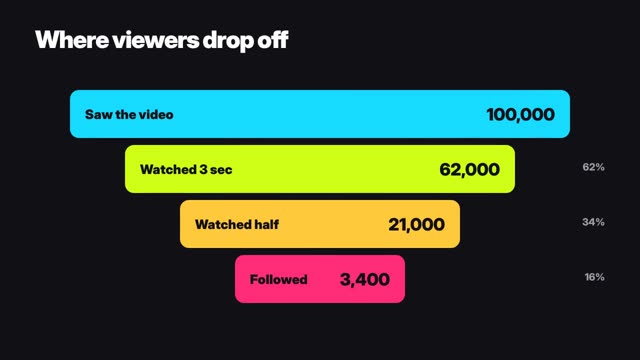
A static chart gets scrolled past. An animated one that builds bar by bar, or a funnel that drains as you watch, holds attention long enough to land the point. That's why data creators and finance channels lean on motion.
Accuracy you can stand behind
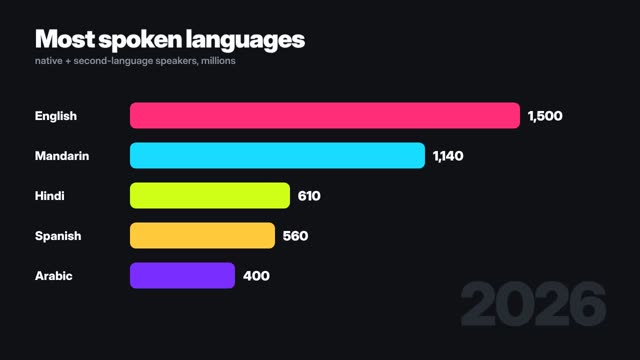
Infographic videos are drawn in code from your numbers. A bar that says 1,500 is exactly 1,500 units long relative to the others. No AI-invented values, no garbled axis labels.
The right chart for the point
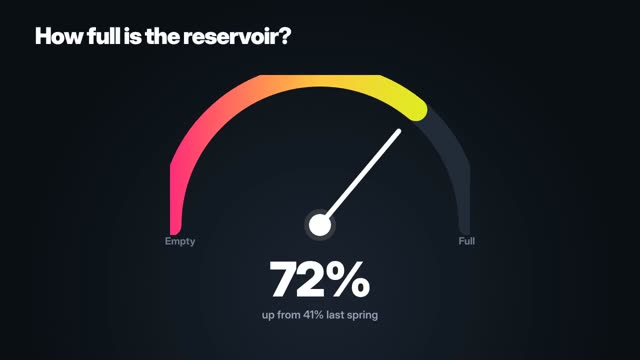
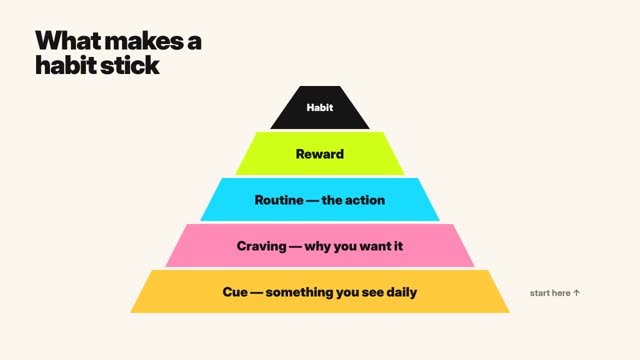
Use a bar race for rankings, a funnel for drop-off, a gauge for one percentage, a pyramid for hierarchy, a versus card for head-to-head, and a world map for 'where'.
Questions
What chart types are available?
Bar races, funnels, gauges, donuts, pyramids, people grids, calendars, Venn diagrams, versus cards, world maps and big-number reveals.
Can I use my brand colours?
Yes. Set the palette and the chart follows it.
Can it make vertical videos?
Yes. Every template exports in 9:16 as well as 16:9.
Do I need design skills?
No. You supply the numbers and the headline; layout and animation are handled.