
Data visualization videos for social media that people read
How to turn data into short social videos: picking one insight, chart types that work vertically, label sizes, build order, pacing and a full sample script.
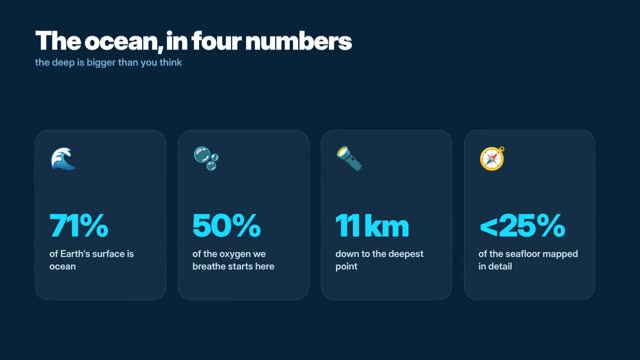
One insight per video
A good data visualization video for social media shows one insight, builds the chart one element at a time, and states the takeaway in words before the viewer has to work it out. Keep it to 20 to 45 seconds, label everything directly, and put the source on screen.
The common failure is a dashboard squeezed into a phone. A busy chart gets scrolled past before anyone finds the point. Pick the single sentence you want them to remember, such as “Rent rose faster than wages in this city,” and design every frame to support that sentence. If you have five insights, make five videos.
Chart types that work on a vertical screen
- One big number: a single value at 200 px or larger with a short label. Best hook format there is.
- Horizontal bars: labels fit on the left, and bars have the full width to grow. Better than vertical columns in 9:16.
- Line chart: good for change over time. Use two lines at most and label them at their ends.
- Part of a whole: a single stacked bar or a 10 by 10 grid of dots reads better on a phone than a pie with many slices.
- Before and after: two numbers side by side with an arrow between them.
Avoid scatter plots, dual axes and maps with fine detail in short-form video. They need time to read that a scrolling viewer will not give.
Design rules for labels, color and contrast
Design on 1080 by 1920 for Shorts, Reels and TikTok, or 1080 by 1350 for feed posts.
- Headline or takeaway: 72 to 96 px, two lines at most.
- Data labels: 44 to 56 px, placed on or next to the data, not in a legend.
- Axis labels: 36 to 40 px. Show only the gridlines you need, often none.
- Source and date: 30 to 36 px, on screen for the whole chart.
- Margins: keep data and text inside a 900 px wide central column and clear of the app’s top and bottom overlays.
Use color to carry meaning, not decoration. Gray for context, one strong color for the data you are talking about. Check text against its background at 4.5:1 or better. Pair color with a label or pattern so the chart still reads for colorblind viewers.
Build the chart in order
Reveal the chart in the order a person would explain it at a whiteboard. This turns a static chart into a sequence the viewer can follow.
- The question, as text, with the voice.
- The frame: axis or baseline and the unit.
- The context data, in gray.
- The focus data, in your accent color, growing or drawing on.
- A highlight: a circle, an arrow or a label on the key point.
- The takeaway sentence.
Hold each step for 1.5 to 3 seconds. Allow no more than 12 words of on-screen text per step, and keep the voiceover to one sentence per step.
A full sample script
This 30-second vertical script uses sample numbers invented for this example. Replace them with your own sourced data.
- 0–3 s · Big number “2×” at 240 px. Text: “Delivery orders doubled.” VO: “Our delivery orders doubled in two years.” (sample numbers)
- 3–7 s · Baseline and unit appear: “Orders per week.” VO: “Here’s how.”
- 7–12 s · Gray bars for 2023 quarters grow in. VO: “In 2023, orders were flat.”
- 12–18 s · Accent bars for 2024 and 2025 grow, steeper. Label on the last bar: “1,200” (sample). VO: “Then we added evening slots.”
- 18–23 s · Arrow and label at the jump: “Evening slots launch.” VO: “That one change did most of the work.”
- 23–28 s · Takeaway: “Timing beat discounts.” VO: “Timing mattered more than discounts.”
- 28–30 s · Source line: “Internal order data, sample numbers.” Brand mark.
Keep the chart truthful
Short videos travel without context, so build trust into the frame.
- Start bar charts at zero. If you must zoom a line chart, say so on screen.
- Show the date range and do not cut it to hide an inconvenient period.
- Name the source and the date you pulled the data.
- Mark projections and estimates with a dashed line and a label.
- If the data is a sample or a survey, say how it was collected in the description.
Making data videos in ClickPop
Video models tend to garble digits and axis labels. In ClickPop, pick an infographic style in Create Video or open Faceless Studio, paste your numbers and the takeaway, and the charts, labels and kinetic type are drawn in code so each value is exact. Add an AI voice, captions and music, then export vertical and feed versions. Styles range from Swiss and isometric to whiteboard, so you can match a brand without redrawing charts.
Mistakes to avoid
- Several insights in one video. Split them into a series.
- Legends. Label the data directly.
- Tiny axis text that disappears after compression.
- Decorative 3D charts that distort the values.
- A takeaway that the chart does not support.
Questions
What is the best chart type for Instagram Reels or TikTok?
A single big number or horizontal bars work best on a vertical screen. They are readable at a glance and leave room for labels.
How long should a data video be?
Twenty to 45 seconds for one insight. Longer explainers can chain several charts if each has its own takeaway.
Should data videos have a voiceover?
A voiceover helps, but many people watch muted. Put the takeaway on screen as text so the video works without sound.