
Lighting setups for AI video: from three-point to neon
The lighting setups cinematographers use, explained for AI video: three-point, Rembrandt, high and low key, golden hour and neon, with prompts you can copy.
The short answer
To light an AI video shot, name where the main light comes from, how hard or soft it is, and what color it is. "Soft window light from the left, warm, deep shadows on the right side of her face" gives the model a real setup to build; "beautiful lighting" gives it nothing.
Try this prompt in Create VideoLight decides mood more than almost anything else in a frame. The same kitchen can read as a cozy breakfast or a thriller depending on where the light sits. Learn a handful of named setups and you can steer the feel of every shot.
The vocabulary you need
- Key light: the main light on the subject. Its direction sets the shape of the face.
- Fill light: a weaker light on the other side that lifts the shadows.
- Back light or rim light: a light behind the subject that outlines hair and shoulders and separates them from the background.
- Hard light: a small or distant source with sharp-edged shadows, like midday sun or a bare bulb.
- Soft light: a large or diffused source with gentle shadow edges, like an overcast sky or a big window.
- High key: bright, low contrast, few shadows. Upbeat, clean, commercial.
- Low key: mostly dark with strong contrast. Drama, mystery, luxury.
- Practical light: a lamp, screen or candle that appears in the shot and lights the scene.
- Motivated light: light that seems to come from a real source in the scene, like a window or a streetlight.
- Color temperature: warm (orange, tungsten, candle) versus cool (blue, daylight shade, moonlight).
Named setups and when to use them
- Three-point lighting: key, fill and back light. The default for interviews and talking heads. Clean and clear.
- Rembrandt: key light high and to one side so a small triangle of light falls on the shadowed cheek. Classic, serious, portrait-like.
- Butterfly: key light high and straight in front, casting a small shadow under the nose. Flattering beauty light.
- Split light: key light directly to one side so half the face is in shadow. Conflict, duality, tension.
- Silhouette: strong back light, no light on the front. Mystery, or hiding identity.
- Golden hour: low warm sun near sunrise or sunset, long shadows, glowing edges. Nostalgia, romance.
- Blue hour: soft cool light just after sunset, with warm windows and streetlights starting to glow. Calm, melancholy.
- Overcast: big soft sky, low contrast. Natural, honest, documentary.
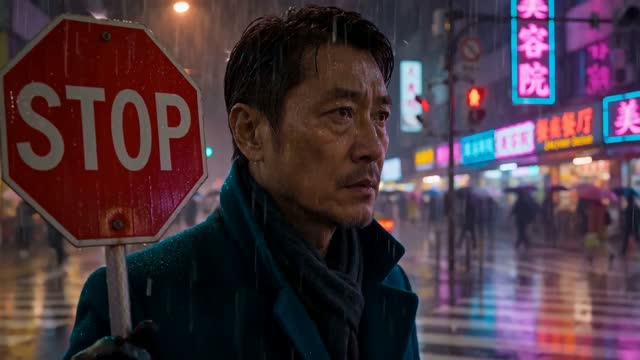
- Neon: colored practical signs, often magenta and cyan, with wet reflective surfaces. Night city, energy, retro future.
- Candlelight or firelight: warm flickering low light from below or the side. Intimacy, period pieces.
Before and after: a lighting prompt
Before: "A detective in his office at night, cinematic lighting, moody, dark, atmospheric."
Why it fails: "cinematic", "moody" and "atmospheric" describe an outcome, not a setup. The model will usually produce a dim, evenly murky frame where the face is hard to read.
After: "A detective in a wrinkled shirt sits at a wooden desk in a dark office at night. Hard light from a single desk lamp to his right lights half his face, the other half falls into shadow. Venetian blinds behind him throw stripes of cool blue streetlight across the wall. A cup of cold coffee sits by his hand. Low-key, high contrast."
Try this prompt in Create VideoThe fixed version names a motivated key (the desk lamp), its direction and hardness, a second source with a different color (blue streetlight through blinds), and the overall contrast. You can picture it, which means the model can too.
Prompts you can copy
- Three-point interview: "Medium close-up of a woman in her forties speaking to camera in a bright studio, soft key light from front left, gentle fill from the right, thin rim light on her hair, plain grey background." Try it
- Rembrandt portrait: "Close-up of an older fisherman with a grey beard, key light high from the left forming a small triangle of light under his right eye, dark background, low key."
- Golden hour: "Wide shot of two friends walking through a wheat field at sunset, sun low behind them, warm backlight glowing through the wheat and their hair, long shadows toward camera."
- Neon night: "A woman in a yellow raincoat waits at a bus stop on a wet city street at night, pink and cyan neon signs reflecting in the puddles, light rain, cool shadows."
- High-key product: "A white sneaker on a white paper backdrop, bright even soft light from all sides, almost no shadows, clean commercial look."
- Silhouette: "A climber stands on a rocky ridge, fully in silhouette against a bright orange sky, no detail on the figure, sun just below the horizon."
Keep light consistent across shots
When you cut between shots of the same scene, the key light has to come from the same side every time. If the window is on her left in the wide shot, it must be on her left in the close-up. Write the light direction into every prompt in the sequence, word for word.
In ClickPop, the Presets library has 54 lighting setups you can apply instead of writing them out, which makes it easier to repeat one exactly. Film Studio lets you set up each shot separately and then cuts them into one graded film. If a finished clip has the wrong light, Edit Video can relight it without starting over.
Mistakes to avoid
- Lighting with adjectives. Swap "dramatic" for a direction, a hardness and a color.
- Too many colored sources. Two colors read as a choice; four read as a nightclub.
- Dark scenes with no edge light. Without a rim or a practical, the subject melts into the background.
- Mixing time of day across a scene. Golden hour in one shot and noon in the next breaks continuity.
Questions
What is the best lighting prompt for AI video?
There is no single best one, but the reliable structure is: where the key light comes from, whether it is hard or soft, what color it is, and how dark the shadows should be. Add a back light if the subject needs to stand out.
What does low key lighting mean?
Low key means most of the frame is dark and there is strong contrast between lit and shadowed areas. It is used for drama, suspense and luxury looks.
Can I change the lighting of an AI video after it is generated?
Yes, with an editing tool. In ClickPop, Edit Video can relight an existing clip, which is quicker than regenerating the whole shot.