
AI video prompts for product shots that look like a real shoot
Copyable AI video prompts for product shots: hero turntables, macro details, pours and in-hand shots, plus why vague prompts fail and how to fix them.
The short answer
A good product shot prompt names the product precisely, then gives the model one surface, one camera move, one lighting setup and one action. Everything else is noise that the model will either ignore or turn into something you did not want.
Think like a product photographer booking a single setup on a tabletop stage. You would not ask the crew for "something cool and premium". You would say: matte black plinth, slow push-in, soft box above and behind, a drop of water running down the bottle. Write the prompt the same way.
The parts of a product shot prompt
Write your prompt in this order. Models weight the start of a prompt more heavily, so the product and the shot type come first.
- Shot type and size: macro, close-up, hero shot, top-down flat lay.
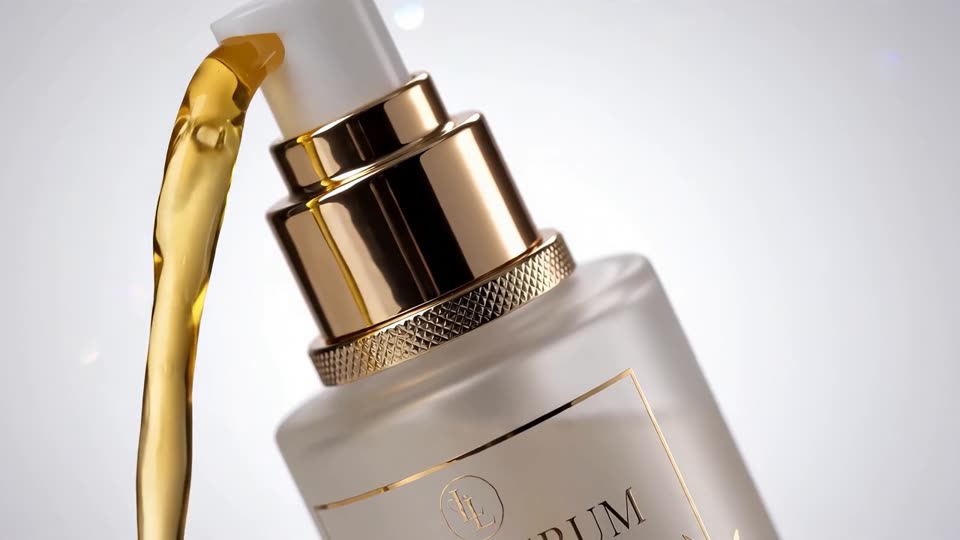
- Product: material, color, shape and finish. "Frosted glass dropper bottle with a brushed gold cap" beats "skincare bottle".
- Surface and background: wet slate, travertine block, paper backdrop sweep, out-of-focus kitchen.
- Camera move: slow push-in, 180-degree orbit, locked-off, top-down slide.
- Lens feel: 100mm macro, shallow depth of field, background falling off to soft bokeh.
- Light: large soft box from the left, hard rim light from behind, warm window light.
- Action: what moves and how. Condensation runs, petals fall, the cap lifts off.
- Grade: clean high-key, moody low-key, warm tungsten.
Before and after: why vague prompts fail
Before: "A cinematic video of a perfume bottle, luxury, high quality, 4K, amazing lighting."
This fails for three reasons. First, none of the adjectives describe something a camera can see, so the model fills the gaps with its own averages: a generic bottle, a generic glow. Second, there is no camera instruction, so you get a random drift or a shot that wanders. Third, "4K" and "high quality" do not change output resolution. Resolution is a setting, not a word in the prompt.
After: "Hero shot of a square amber glass perfume bottle with a faceted crystal stopper, standing on a block of wet black slate. Slow push-in from medium close-up to close-up. Large soft box above and behind creating a glowing rim on the glass edges, deep black background. Fine mist drifts across the frame from the left. Moody low-key grade, rich amber highlights."
Try this prompt in Create VideoThe fixed version reads like a call sheet. Every phrase points at something visible, the move has a start and an end, and there is one source of motion besides the camera. That is enough for the model to commit.
Prompts you can copy by shot type
Swap in your product and keep the structure. Each one is built for a clip of a few seconds.
- Turntable hero: "White ceramic coffee mug with a speckled glaze rotating slowly on a turntable, light grey paper backdrop, locked-off camera at eye level, soft even light from two large soft boxes, clean high-key look." Try it
- Macro detail: "Extreme close-up macro of the stitching on a tan leather wallet, camera slides slowly left to right along the seam, shallow depth of field, warm side light raking across the grain to show texture." Try it
- Pour or splash: "Close-up of iced coffee being poured into a clear glass of ice cubes on a walnut counter, slow motion, liquid swirling into the milk, backlit by a bright window so the liquid glows, shallow depth of field."
- In-hand: "Medium close-up of an adult hand with natural nails holding a matte green water bottle, the thumb flips the lid open, soft daylight from a window, blurred kitchen background, handheld feel with gentle movement."
- Top-down flat lay: "Top-down shot of a canvas backpack lying on a wooden floor surrounded by a notebook, sunglasses and a water bottle, camera rises slowly straight up to reveal the whole arrangement, soft overcast light, natural colors."
- Reveal: "A sneaker sitting in deep shadow on a concrete floor, a hard spotlight snaps on from above and lights the shoe, dust drifts in the beam, camera holds still, high-contrast low-key look."
- Lifestyle placement: "Wide shot of a linen armchair beside a tall window in a sunlit living room, a knitted throw over the arm, camera trucks slowly right, warm afternoon light with long soft shadows."
Keep the product accurate
Text-only prompts invent details. Labels warp, logos turn into near-letters, a cap changes shape halfway through. If the product must look exactly like the real one, start from a photo.
In ClickPop, open Create Video and add a clean still of your product as the starting image. Your prompt then only needs to describe the move, the light change and the action, because the look comes from the photo. Shoot or generate that still on a plain background with the label facing the camera and the product filling a good part of the frame.
Plan around text. Small print is the first thing to break. Frame so the label is turned slightly away during movement, or let it pass through shallow focus, and put the product name and price on as captions in the edit rather than asking the model to render them.
A 15-second product sequence
One clip rarely sells a product. Three or four short shots cut together do. Here is a shot list for a skincare serum you can adapt:
- Shot 1, about 3 seconds: macro of a single drop falling from the dropper into the bottle, backlit, slow motion.
- Shot 2, about 4 seconds: hero shot, slow push-in on the bottle on wet stone, soft box rim light.
- Shot 3, about 4 seconds: in-hand, an adult hand tilts the bottle toward camera, soft daylight.
- Shot 4, about 4 seconds: flat lay with the bottle and its box, camera rises to reveal, space at the top for the product name.
Keep the same grade and the same light direction across all four so they cut together. If you want the model to keep these consistent for you, Film Studio lets you set camera, lens and move shot by shot and then cuts the shots into one graded film.
Mistakes to avoid
- Stacking camera moves. "Orbit while pushing in and tilting up" usually produces wobble. One move per shot.
- Too many moving parts. A pour, falling petals and a rotating product in one shot will fight each other.
- Quality words instead of visual words. Replace "premium" with the material and the light that make something look premium.
- Asking for small readable text. Add it in the edit.
- Making health or performance claims in the visuals or captions for beauty, food or supplement products. Show the product; let the brand's approved copy make any claims.
- Rendering every idea at full quality. Draft on a cheaper model, pick the take that works, then render the final on the model you want. The price shows before you generate.
Questions
What is the best prompt structure for an AI product video?
Start with the shot type and an exact description of the product, then add surface, one camera move, the lighting and a single action. Finish with the grade. Keep each phrase tied to something the camera can see.
Why does my product's label look wrong in AI video?
Video models struggle with small text and fine logos, especially in motion. Start from a real photo of the product, keep the label still or turned slightly away, and add names and prices as captions in the edit.
Should I use text-to-video or image-to-video for products?
Use image-to-video when the product must match the real thing. Text-to-video is fine for mood shots, backgrounds and concept tests where the exact product is not on screen.