
AI product videos for jewelry: sparkle, macro and on-hand shots
How to make jewelry product videos with AI: macro sparkle shots, slow turns and on-hand clips from your own photos, with prompts and the claims to avoid.
The short answer
Jewelry videos need three shots: a slow turn that shows the piece from every side, a macro shot that catches light on the stones or metal, and an on-hand or on-body shot that shows real scale. AI can make all three from good product photos, as long as you keep the piece exactly as it is.
Jewelry is where AI is most tempted to cheat. It adds sparkle that the stone does not have, smooths settings, changes metal color and grows stones. Buyers compare the video with what arrives. Every shot must start from a photo of the real piece, and every render must be checked under magnification.
The shots every piece needs
- Hero turn: the piece rotating slowly on a plain surface or display. Shows shape and all sides.
- Macro sparkle: a very close push across the stone or the metal surface as a light moves.
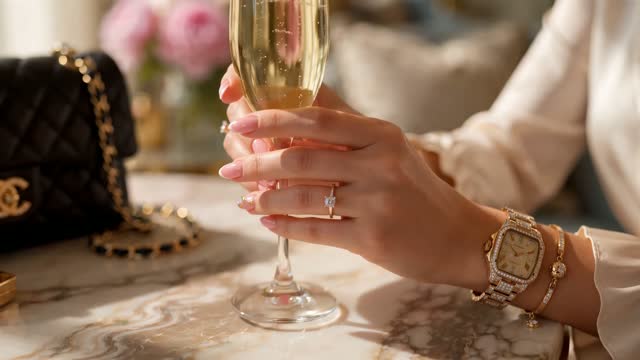
- Scale shot: on a hand, ear, neck or wrist of a fictional adult character, with a natural pose.
- Detail: clasp, setting, hallmark or engraving, from your own close-up photo.
- Box and packaging: the piece in its box, for gifting.
- Styling clip: the piece with an outfit, for social.
Worked example: prompts for a gold ring with a single stone
Use your own photo of the ring as the first frame for each of these. Add "ring unchanged" to every prompt.
- Hero turn, 6 s: "Slow 360-degree turn of the ring on a matte black riser, single soft key light from above left, ring unchanged, no added stones, metal color unchanged." Try it
- Macro sparkle, 5 s: "Extreme macro, slow push across the stone, a small light moves slowly from left to right creating natural highlights, shallow depth of field, ring unchanged." Try it
- On hand, 5 s: "Close-up of an adult hand with natural nails resting on a linen surface, wearing the ring as in the reference photo, slight finger movement, window light." Try it
- Detail, 4 s: from your close-up of the band's inside. "Very slow push in on the engraving, static light."
- Packaging, 4 s: "Static, the ring box lid opens slowly, soft warm light."
Cut these into a 20-second product page video and a vertical social clip. Put the metal, stone and size range in captions, taken from your product records.
Lighting is most of the work
Sparkle in a video comes from light moving across facets. In a prompt, describe a small, moving light source rather than asking for sparkle. Ask for a dark or neutral background so highlights show. For gold and silver, ask for soft, broad light to avoid harsh blown spots.
ClickPop's Presets include 54 lighting setups and 16 camera moves. Pick one lighting setup and one move for your whole catalog so every product page looks like the same studio. For the most control over a hero film, Film Studio at /app/cinema-studio lets you set the lens, focal length and aperture for each shot, which helps with macro depth of field.
How to make it step by step
- Photograph each piece in sharp focus from the front, side, back and top, plus close-ups of stones and details. Use a tripod and diffused light.
- Design a fictional adult hand or model in Characters at /app/characters so on-body shots look consistent across products.
- Generate the hero turn and macro in Create Video from your photos. Use UGC at /app/ugc if you want a creator-style unboxing or try-on.
- Inspect every clip at full size. Count stones, check prongs, compare metal tone and shape. Throw away any clip that changed the piece.
- Add captions with material details from your records, and licensed or generated music.
- Export square or 4:5 for product pages and 9:16 for social.
Claims and rules to watch
- Material and stone claims must match your documentation: metal purity, natural or lab-grown stone, plated or solid. Many countries have specific rules for describing precious metals and gems, so check with your trade body or a professional.
- Do not let AI make a stone look clearer or larger than it is. That is a misrepresentation of the product.
- No healing, energy or wellness claims for crystals or stones.
- No real person's hand, face or likeness in AI footage without written consent.
- No designer brand references or look-alikes of trademarked designs.
- Label realistic AI content where platforms require it.
Mistakes to avoid
Over-sparkle is the first. A video full of stars and flares looks cheap and does not match the real stone. Let the light do it. The second is busy backgrounds that compete with a small piece. Keep the background plain and the piece large in frame. The third is scale confusion. Without an on-hand shot, a pendant can look twice its size. Always include one scale shot per piece.
Another is skipping the check under magnification. A render can look perfect at phone size and still have five prongs where the ring has four. Watch every clip enlarged on a large screen before it goes live, next to the real piece if you can.
Last, keep one approved prompt set for the whole catalog. When a new piece arrives, swap the photo and the product name, and the new video will match the rest of the store.
Questions
How do you make jewelry sparkle in an AI video?
Describe a small light moving slowly across the piece on a dark or neutral background. Avoid asking for sparkle effects, which add highlights the real stone does not have.
Can I make jewelry videos from product photos?
Yes. Use sharp photos of the real piece as first frames, prompt only the camera and light, and inspect every render so stones, settings and metal stay unchanged.
Do I need on-hand shots for jewelry?
Yes. An on-hand or on-body shot shows real scale, which reduces surprises and returns. Use a fictional adult character, not a real person without consent.