
AI lookbook videos for fashion brands
How a fashion brand can make lookbook videos with AI models wearing its real pieces, with a shot plan per look, consistency tips and the consent rules.
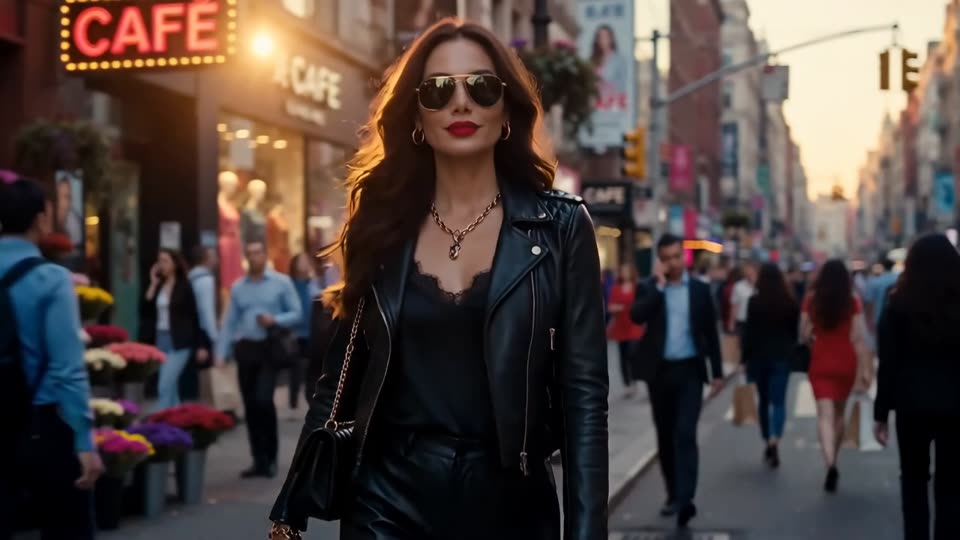
What an AI lookbook video is
An AI lookbook video shows a fashion collection on a model moving through a setting, built from your garment photos and a fictional model character instead of a full shoot. You get walk-ins, turns, fabric movement and detail shots for every look, in one consistent style, and you can cut the same footage for product pages, social and ads.
The garments are the product, so they must stay true. Color, cut, length, print scale and fabric behavior should match what the customer receives. AI is very good at moving a camera and a model. It is less reliable with exact prints, logos and seams, so check every frame against the real piece.
The videos a fashion brand needs
- Collection film: a short horizontal or vertical film for the launch, one look after another.
- Look-by-look clips: one short vertical clip per look for product pages and Reels.
- Detail clips: fabric, buttons, stitching, the drape of a hem, made from your own close-up photos.
- Styling videos: one piece worn three ways.
- Creator-style try-ons: a fictional creator character trying the pieces on, for TikTok and ads.
- Size and fit clips: the same piece on two or three fictional models of different builds, with each model's height and size in the caption, only if you have built them that way.
Build your model characters first
Consistency starts with the model. In ClickPop, open Characters at /app/characters and design one to three fictional adult models. Pick the image model, then draw 1 to 10 reference photos: front, three-quarter, full body, profile and close-ups. Those photos go with every video, so the same face and build appear in every look and every season.
Write down each model's look in a short description you reuse: hair, skin tone, build, and the poses that suit the brand. Do not base a model on a real person, and do not use photos of a real model unless you have their written permission for AI use.
Worked example: a shot plan for one look
A linen summer set, shirt and wide trousers, in sand color. Five clips per look, each from a flat-lay or mannequin photo plus the model character.
- Walk-in, 5 s: "Full body, the model walks toward camera on a pale stone terrace, morning sun, linen shirt and wide trousers in sand as in the reference photo, fabric moves naturally, camera static." Try it
- Turn, 4 s: "Medium-wide, the model turns slowly to show the back of the shirt, soft wind." Try it
- Detail, 4 s: from your close-up photo of the shirt cuff. "Very slow macro push in on the linen weave and button, shallow depth of field." Try it
- Movement, 4 s: "The model sits on a low wall, trousers fall naturally, relaxed pose."
- End frame, 3 s: still of the full look with product name and colorway as text.
Reuse the terrace setting, time of day and grade for every look in the collection. Change only the garments. That repetition is what makes it feel like one shoot.
How to make it step by step
- Photograph every piece flat and on a mannequin or hanger, front and back, plus close-ups of fabric and details, in neutral light.
- Design your model characters with reference photos.
- Open UGC at /app/ugc for creator-style try-ons, or Create Video for editorial walk-ins and turns, giving it the character and the garment photos.
- Pick one grade from Presets, such as a film stock look, and keep it for the season.
- Compare each clip to the garment: color, length, print, logo placement. Re-render anything that drifted.
- Cut look-by-look clips for product pages, a collection film for launch, and vertical try-ons for social.
For a launch film with many looks, Productions at /app/productions takes one brief and returns a cast, a shot list and a finished cut made of many shots.
Where each video goes
Look-by-look clips sit in the product page gallery next to the photos. The collection film goes on the homepage, YouTube and the launch email. Vertical try-ons and styling videos go to Instagram Reels, TikTok and Pinterest. Ad Studio at /app/ad-studio can make several hook variants from the same footage for testing.
Plan the release like a drop. Post the collection film on launch day, then one look per day for the following week, each linking to its product page. Styling videos work best once people have seen the pieces, so save them for the second week. When a piece sells out, take its clips out of rotation so you are not advertising something customers cannot buy.
What to avoid
- Showing a garment differently from how it ships: brighter color, longer hem, different fit.
- Generated prints that do not match your real print. If the print is a key feature, show it with your own photo.
- Real models' faces or bodies in AI footage without written consent for that use.
- Other brands' logos, bags or shoes in the styling.
- Copyrighted characters or designs on garments in AI scenes.
- Body-altering edits that misrepresent fit, such as slimming a model to make a garment drape differently.
- Unverified material claims like sustainable, organic or recycled without documentation.
- Licensed music you have not cleared. Fashion films often use music that brands have not licensed for social.
Label realistic AI models where TikTok, YouTube and Meta require it, and consider saying in your product page that the model is AI-generated. Customers increasingly ask, and a clear answer builds trust.
Questions
Can a fashion brand use AI models instead of real models?
Yes, with fictional adult characters you design. Keep the garments exactly as they are, and label realistic AI content where platforms require it.
How do I keep the same AI model across a whole collection?
Design the character once with several reference photos and use those references in every video. Keep the setting, light and grade the same too.
Will AI get my prints and logos right?
Not always. Check every frame, and use your own close-up photos for prints, logos and labels that customers need to see exactly.