
Slow motion and speed ramps in AI video
How to get slow motion and speed ramps in AI video: what to slow down, how to prompt it, when to retime in the edit, and shot ideas you can copy.
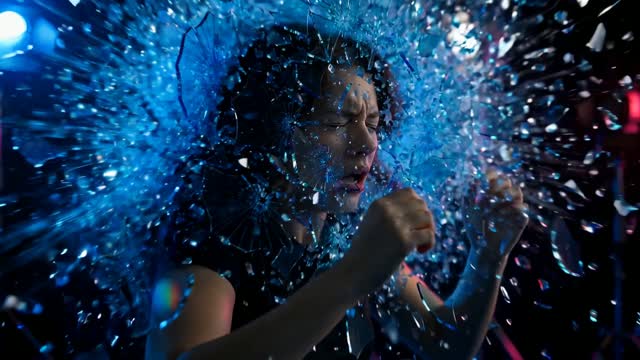
The short answer
For slow motion in AI video, ask for it in the prompt and pick a subject that rewards it: liquids, hair, fabric, sparks, dust, an impact. For a speed ramp, where action runs at normal speed, drops into slow motion and snaps back, generate the slow-motion moment as its own shot and do the ramp in the edit.
On a film set, slow motion comes from shooting more frames per second than you play back, called overcranking. AI models do not shoot; they render the motion directly. So you either ask the model to render slow motion, or you slow down footage afterwards with frame interpolation, which invents in-between frames.
What deserves slow motion
Slow motion works when there is detail the eye cannot catch at normal speed. It fails when nothing is happening.
- Liquids: pours, splashes, droplets, a wave breaking.
- Hair and fabric: a head turn, a dress spinning, a flag in wind.
- Particles: dust, flour, sparks, confetti, snow, smoke.
- Impacts: a foot hitting a puddle, a ball meeting a racket, a glass landing on a table.
- Emotion beats: a look, a smile breaking, a hug. Used sparingly.
- Product moments: a cap twisting off, a lid opening, ice dropping into a drink.
Before and after: a slow-motion prompt
Before: "Slow motion video of a man running, epic, cinematic."
Why it fails: running at slow speed with nothing else in frame is just a man moving slowly. There is no detail to reveal, and long slow clips of bodies are where limbs start to look rubbery.
After: "Slow motion, low angle close-up of a trail runner's shoe striking a shallow puddle on a forest path, water spraying outward in a crown of droplets, mud flecks lifting, morning backlight making the droplets glow. Camera locked off at ground level."
Try this prompt in Create VideoThe fixed prompt picks a short moment rich in detail, frames it close so the detail fills the screen, and lights it from behind so the droplets read. The body barely appears, which keeps the shot clean.
Prompts you can copy
- Pour: "Slow motion close-up, honey pouring from a wooden dipper onto a stack of pancakes, thick ribbon folding on itself, warm side light, shallow depth of field." Try it
- Hair: "Slow motion medium close-up, a woman turns her head toward camera, long dark hair swinging out in an arc, strands catching golden backlight, plain dark background." Try it
- Flour: "Slow motion, a baker claps floured hands above a wooden table, a cloud of flour bursts and drifts in a beam of window light."
- Ice: "Slow motion macro, an ice cube drops into a glass of sparkling water, bubbles burst upward, splash droplets hang in the air, cool backlight."
- Fabric: "Slow motion wide shot, a long red silk scarf lifts and ripples in the wind on a sand dune at sunset, camera locked off."
How to build a speed ramp
A speed ramp shifts speed inside one shot. It is a staple of sports, action and product ads because it pulls the eye to a single moment.
- Pick the moment. The ramp lands on one beat: the kick, the splash, the catch.
- Generate the action at normal speed, with the key beat in the middle of the clip and some lead-in and follow-through on each side.
- If the key beat needs fine detail, generate a second clip of just that moment in slow motion with matching framing, light and grade.
- In the edit, play the lead-in at normal speed, ease the speed down into the beat over a few frames, hold slow motion briefly, then ease back up. The easing is what makes it feel like a ramp and not a jump cut.
- Add sound design: a whoosh into the slow section, a deeper or muffled sound during it, and a hard hit as speed returns.
Worked example for a sneaker ad: shot runs at normal speed as the runner approaches a puddle, ramps down as the shoe hits the water, holds as the spray crowns, then ramps back up as she runs out of frame. If the model's single clip blurs the splash, cut to the separately generated slow-motion splash at the moment of impact and ramp out of it.
Retiming in the edit
Slowing down normal-speed AI footage in an editor uses frame interpolation. It works well on smooth, simple motion such as a camera drift or flowing water. It struggles with fast crossing limbs, spinning objects and fine detail, where you may see ghosting or melting edges.
When the slow moment matters, ask the model for slow motion directly rather than stretching a normal clip. Use editor retiming for small adjustments and for the ramps in and out.
In ClickPop's Film Studio you set camera, lens and move shot by shot and then cut the shots into one graded film, which keeps a separately generated slow-motion insert matched to the shots around it.
Mistakes to avoid
- Slow motion on everything. It loses impact quickly. Save it for one or two moments.
- Long slow-motion clips of whole bodies. Keep slow shots short and close.
- Stretching footage too far in the edit. Heavy interpolation shows as smearing.
- Silent slow motion. Sound sells the change in speed.
- Mismatched light between the normal and slow clips in a ramp. Copy the light and grade lines exactly.
Questions
How do I make slow motion in AI video?
Ask for slow motion in the prompt and choose a short moment with detail: liquids, hair, particles or an impact. Frame it close and light it so the detail shows.
What is a speed ramp?
A change of speed within a shot: normal speed easing into slow motion on a key moment, then easing back to normal. It focuses attention on one beat.
Can I slow down AI video after generating it?
Yes, with frame interpolation in an editor. It works on smooth, simple motion; for important slow moments, generate them in slow motion directly.